0%

Midjourney Tasks API 的对接和使用

Midjourney Tasks API 的主要功能是通过输入Midjourney Imagine API 或 Midjourney Describe API 生成的任务ID来查询该任务的执行情况。

本文档将详细介绍 Midjourney Tasks API 的对接说明,帮助您轻松集成并充分利用该 API 的强大功能。通过 Midjourney Tasks API ,您可以轻松实现查询 Midjourney Imagine API 或 Midjourney Describe API 的任务执行情况。

申请流程

要使用 Midjourney Tasks API,需要先到 申请页面 Midjourney Imagine API 申请相应的服务,然后复制Imagine API的任务ID,如图所示:

最后进入Tasks API页面 Midjourney Tasks API 申请相应的服务,进入页面之后,点击「Acquire」按钮,如图所示:
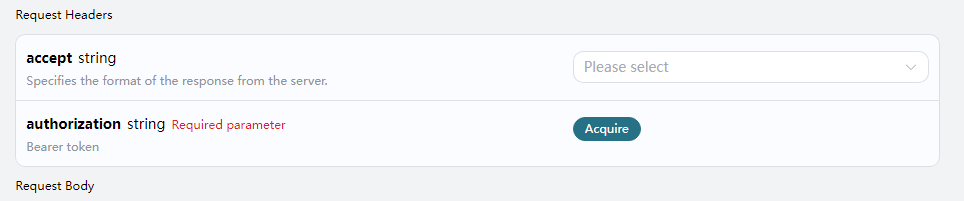
申请页面

如果您尚未登录或注册,会自动跳转到登录页面邀请您来注册和登录,登录注册之后会自动返回当前页面。

首次申请时会有免费额度赠送,可以免费使用该 API。

请求示例

MIdjourney Tasks API 可以用于查询 MIdjourney Imagine API 和 MIdjourney Describe API 两个 API 的结果。关于怎样使用 MIdjourney Imagine API,请参考文档 Midjourney Imagine API 。关于怎样使用 Midjourney Describe,请参考 Midjourney Describe API

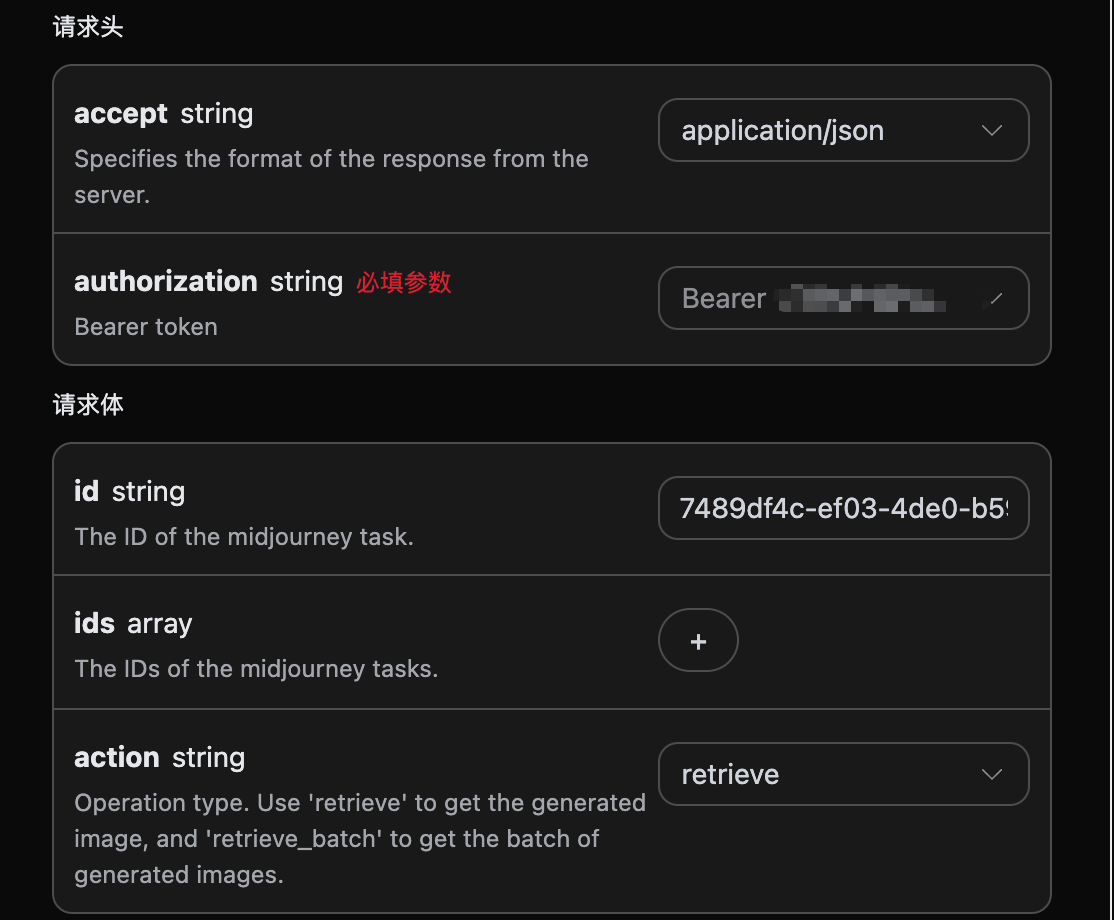
我们以 Midjourney Imagine API 服务返回的任务ID一个为例,演示如何使用该 API。假设我们有一个任务ID:7489df4c-ef03-4de0-b598-e9a590793434,接下来演示如何通过传入一个任务ID来。

任务示例图

设置请求头和请求体

Request Headers 包括:

  • accept:指定接收 JSON 格式的响应结果,这里填写为 application/json
  • authorization:调用 API 的密钥,申请之后可以直接下拉选择。

Request Body 包括:

  • id:上传的任务ID。
  • ids:批量查询时的任务 ID 数组。
  • action:对任务的操作方式,支持 retrieve(单查)与 retrieve_batch(批量)。

设置如下图所示:

代码示例

可以发现,在页面右侧已经自动生成了各种语言的代码,如图所示:
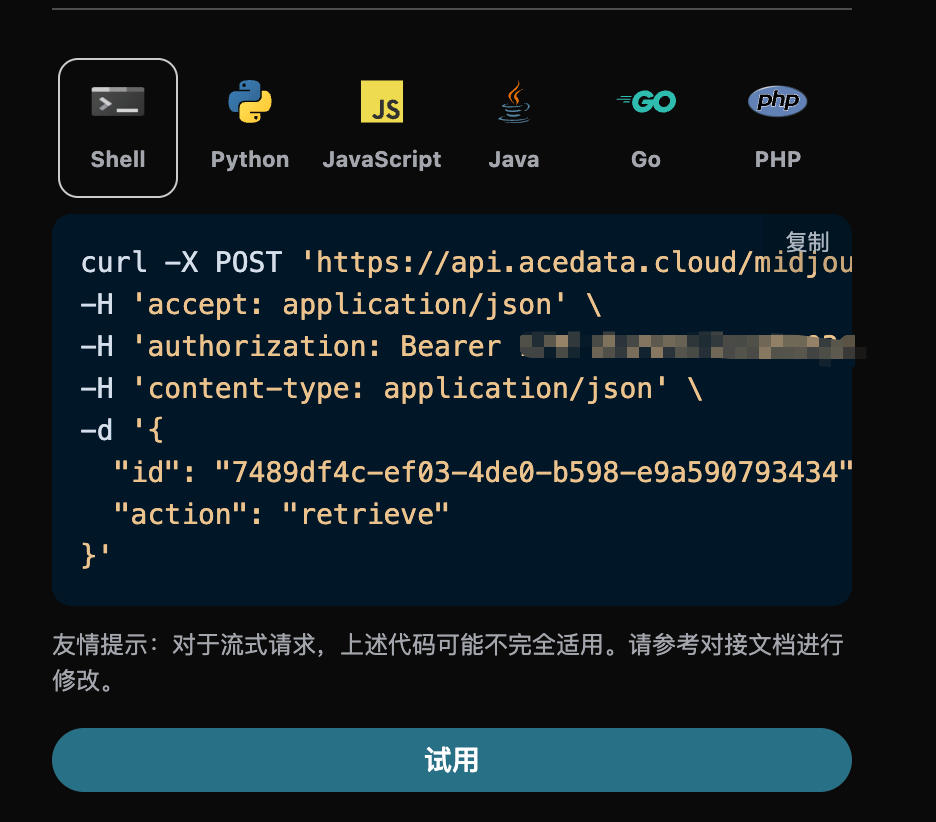
部分代码示例如下:

CURL

1
2
3
4
5
6
7
8
curl -X POST 'https://api.acedata.cloud/midjourney/tasks' \
-H 'accept: application/json' \
-H 'authorization: Bearer {token}' \
-H 'content-type: application/json' \
-d '{
"id": "7489df4c-ef03-4de0-b598-e9a590793434",
"action": "retrieve"
}'

Python

1
2
3
4
5
6
7
8
9
10
11
12
13
14
15
16
17
import requests

url = "https://api.acedata.cloud/midjourney/tasks"

headers = {
"accept": "application/json",
"authorization": "Bearer {token}",
"content-type": "application/json"
}

payload = {
"id": "7489df4c-ef03-4de0-b598-e9a590793434",
"action": "retrieve"
}

response = requests.post(url, json=payload, headers=headers)
print(response.text)

响应示例

请求成功后,API 将返回此处图片任务的详情信息。例如:

1
2
3
4
5
6
7
8
9
10
11
12
13
14
15
16
17
18
19
20
21
22
23
24
25
26
27
28
29
30
31
32
33
34
35
36
37
38
39
40
41
42
43
{
"_id": "668aae3f550a4144a540803b",
"id": "7489df4c-ef03-4de0-b598-e9a590793434",
"application_id": "9dec7b2a-1cad-41ff-8536-d4ddaf2525d4",
"created_at": 1720364607.967,
"credential_id": "68253cc8-505d-47f4-97ad-0050a62e4975",
"request": {
"mode": "fast",
"prompt": "A cat sitting on a table",
"action": "generate"
},
"type": "imagine",
"hold": false,
"image_id": "1259525319472185344",
"job_id": "da317da6-f500-48e6-bf32-dd48b3e6f84f",
"response": {
"image_url": "https://platform.cdn.acedata.cloud/midjourney/7489df4c-ef03-4de0-b598-e9a590793434.png?imageMogr2/thumbnail/!50p",
"image_width": 1024,
"image_height": 1024,
"actions": [
"upscale1",
"upscale2",
"upscale3",
"upscale4",
"reroll",
"variation1",
"variation2",
"variation3",
"variation4"
],
"raw_image_url": "https://platform.cdn.acedata.cloud/midjourney/7489df4c-ef03-4de0-b598-e9a590793434.png",
"raw_image_width": 2048,
"raw_image_height": 2048,
"progress": 100,
"image_id": "1259525319472185344",
"task_id": "7489df4c-ef03-4de0-b598-e9a590793434",
"success": true,
"job_id": "da317da6-f500-48e6-bf32-dd48b3e6f84f",
"hold": false
},
"duration": 29.437000036239624,
"finished_at": 1720364637.404
}

返回结果一共有多个字段,request 字段就是发起任务时的 request body,同时response 字段是任务完成后返回的response body,如果 type = imagine,其结果和 Midjourney Imagine API 的请求和返回一致,如果 type = describe,其结果和 Midjourney Describe API 的请求和返回一致。字段介绍如下。

  • id,生成此图像任务的 ID,用于唯一标识此次图像生成任务。
  • type,如果 type = imagine 代表是 Midjourney Imagine API 的结果,如果 type = describe 代表是 Midjourney Describe API 的结果。
  • job_id,生成此次查询图像任务的 ID,用于唯一标识此次查询图像任务。
  • image_id,此处查询的图片任务重图片的唯一标识,在下次需要对图片进行变换操作时需要传此参数。
  • request,查询图片任务中的请求信息。
  • response,查询图片任务中的返回信息。

批量查询操作

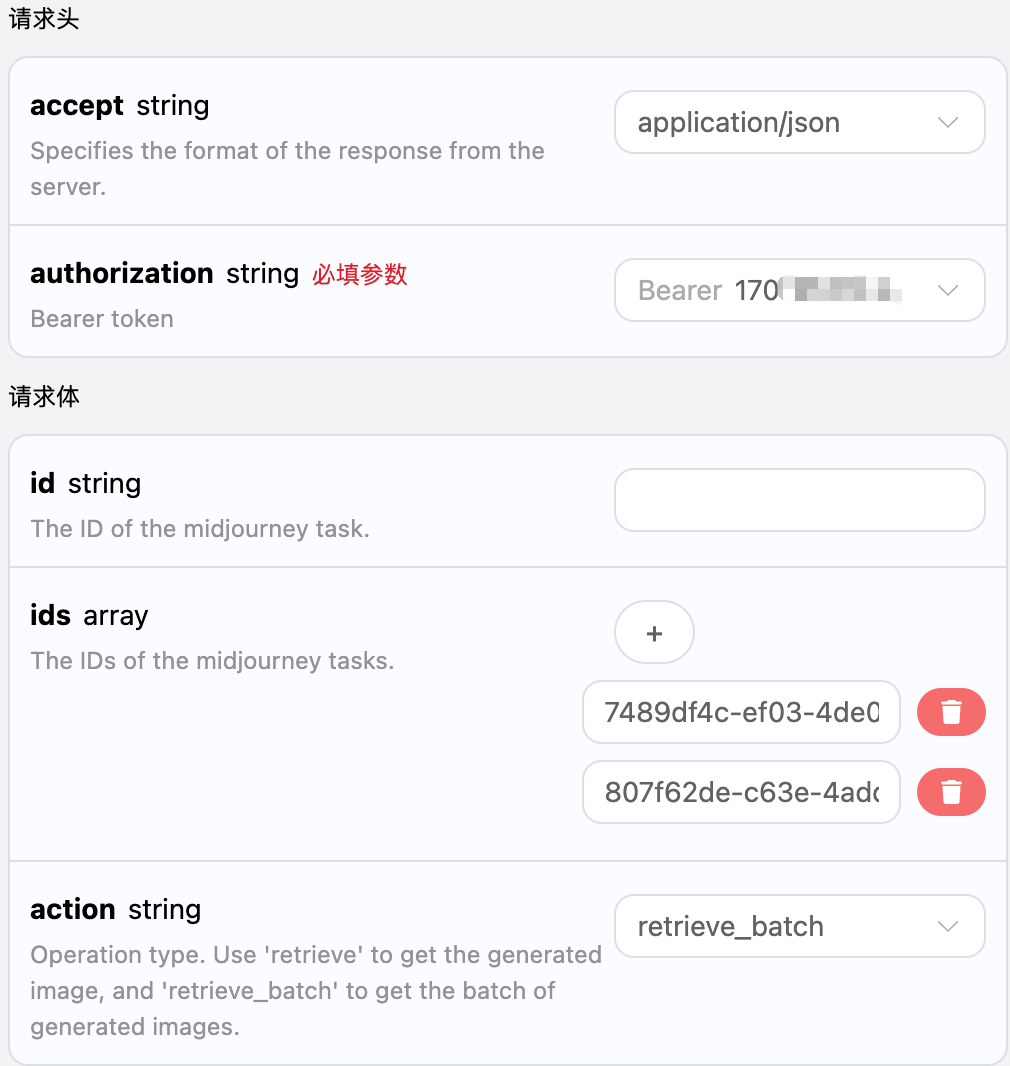
这是是针对多个任务ID来进行查询图片任务详情,与上面不同的是需要将action选中为retrieve_batch

Request Body 包括:

  • ids:上传的任务ID数组。
  • action:对任务的操作方式。

设置如下图所示:

代码示例

可以发现,在页面右侧已经自动生成了各种语言的代码,如图所示:

部分代码示例如下:

CURL

1
2
3
4
5
6
7
8
9
curl -X POST 'https://api.acedata.cloud/midjourney/tasks' \
-H 'accept: application/json' \
-H 'authorization: Bearer {token}' \
-H 'content-type: application/json' \
-d '{
"action": "retrieve_batch",
"id": "",
"ids": ["7489df4c-ef03-4de0-b598-e9a590793434","807f62de-c63e-4add-8345-7f0ae6dd18e7"]
}'

Python

1
2
3
4
5
6
7
8
9
10
11
12
13
14
15
16
17
18
import requests

url = "https://api.acedata.cloud/midjourney/tasks"

headers = {
"accept": "application/json",
"authorization": "Bearer {token}",
"content-type": "application/json"
}

payload = {
"action": "retrieve_batch",
"id": "",
"ids": ["7489df4c-ef03-4de0-b598-e9a590793434","807f62de-c63e-4add-8345-7f0ae6dd18e7"]
}

response = requests.post(url, json=payload, headers=headers)
print(response.text)

响应示例

请求成功后,API 将返回此次所有批量图片任务的具体详情信息。例如:

1
2
3
4
5
6
7
8
9
10
11
12
13
14
15
16
17
18
19
20
21
22
23
24
25
26
27
28
29
30
31
32
33
34
35
36
37
38
39
40
41
42
43
44
45
46
47
48
49
50
51
52
53
54
55
56
57
58
59
60
61
62
63
64
65
66
67
68
69
70
71
72
73
74
75
76
77
78
79
80
81
82
83
84
85
86
87
88
89
90
91
{
"items": [
{
"_id": "668aae3f550a4144a540803b",
"id": "7489df4c-ef03-4de0-b598-e9a590793434",
"application_id": "9dec7b2a-1cad-41ff-8536-d4ddaf2525d4",
"created_at": 1720364607.967,
"credential_id": "68253cc8-505d-47f4-97ad-0050a62e4975",
"request": {
"mode": "fast",
"prompt": "A cat sitting on a table",
"action": "generate"
},
"type": "imagine",
"hold": false,
"image_id": "1259525319472185344",
"job_id": "da317da6-f500-48e6-bf32-dd48b3e6f84f",
"response": {
"image_url": "https://platform.cdn.acedata.cloud/midjourney/7489df4c-ef03-4de0-b598-e9a590793434.png?imageMogr2/thumbnail/!50p",
"image_width": 1024,
"image_height": 1024,
"actions": [
"upscale1",
"upscale2",
"upscale3",
"upscale4",
"reroll",
"variation1",
"variation2",
"variation3",
"variation4"
],
"raw_image_url": "https://platform.cdn.acedata.cloud/midjourney/7489df4c-ef03-4de0-b598-e9a590793434.png",
"raw_image_width": 2048,
"raw_image_height": 2048,
"progress": 100,
"image_id": "1259525319472185344",
"task_id": "7489df4c-ef03-4de0-b598-e9a590793434",
"success": true,
"job_id": "da317da6-f500-48e6-bf32-dd48b3e6f84f",
"hold": false
},
"duration": 29.437000036239624,
"finished_at": 1720364637.404
},
{
"_id": "668b41d6550a4144a551d996",
"id": "807f62de-c63e-4add-8345-7f0ae6dd18e7",
"application_id": "9dec7b2a-1cad-41ff-8536-d4ddaf2525d4",
"created_at": 1720402390.341,
"credential_id": "6fd3e1d5-4bd6-47e8-8872-fab89a183b53",
"request": {
"mode": "fast",
"prompt": "A beautiful girl",
"action": "generate"
},
"type": "imagine",
"hold": false,
"image_id": "1259683790612070400",
"job_id": "ede5c805-e231-498c-8f74-3aa76d5d6d12",
"response": {
"image_url": "https://platform.cdn.acedata.cloud/midjourney/807f62de-c63e-4add-8345-7f0ae6dd18e7.png?imageMogr2/thumbnail/!50p",
"image_width": 1024,
"image_height": 1024,
"actions": [
"upscale1",
"upscale2",
"upscale3",
"upscale4",
"reroll",
"variation1",
"variation2",
"variation3",
"variation4"
],
"raw_image_url": "https://platform.cdn.acedata.cloud/midjourney/807f62de-c63e-4add-8345-7f0ae6dd18e7.png",
"raw_image_width": 2048,
"raw_image_height": 2048,
"progress": 100,
"image_id": "1259683790612070400",
"task_id": "807f62de-c63e-4add-8345-7f0ae6dd18e7",
"success": true,
"job_id": "ede5c805-e231-498c-8f74-3aa76d5d6d12",
"hold": false
},
"duration": 29.471999883651733,
"finished_at": 1720402419.813
}
],
"count": 2
}

返回结果一共有多个字段,其中items是包含了批量图片任务的具体详情信息,每个图片任务的具体信息与上文的字段一样,字段信息如下。

  • items,批量图片任务的所有具体详情信息。它是一个数组,每个数组的元素和上文查询单个任务的返回结果格式是一样的。
  • count,此处批量查询图片任务的个数。

错误处理

在调用 API 时,如果遇到错误,API 会返回相应的错误代码和信息。例如:

  • 400 token_mismatched:Bad request, possibly due to missing or invalid parameters.
  • 400 api_not_implemented:Bad request, possibly due to missing or invalid parameters.
  • 401 invalid_token:Unauthorized, invalid or missing authorization token.
  • 429 too_many_requests:Too many requests, you have exceeded the rate limit.
  • 500 api_error:Internal server error, something went wrong on the server.

错误响应示例

1
2
3
4
5
6
7
8
{
"success": false,
"error": {
"code": "api_error",
"message": "fetch failed"
},
"trace_id": "2cf86e86-22a4-46e1-ac2f-032c0f2a4e89"
}

结论

通过本文档,您已经了解了如何使用 Midjourney Tasks API 进行查询单个或批量图片任务的所有具体详情信息。希望本文档能帮助您更好地对接和使用该 API。如有任何问题,请随时联系我们的技术支持团队。