AI 证件照 Task API 的主要功能是通过输入 AI证件照制作 API 生成的任务ID来查询该任务的执行情况。
本文档将详细介绍 AI 证件照 Task API 的对接说明,帮助您轻松集成并充分利用该 API 的强大功能。通过 AI 证件照 Task API ,您可以轻松实现查询 AI证件照制作 API 的任务执行情况。
申请流程
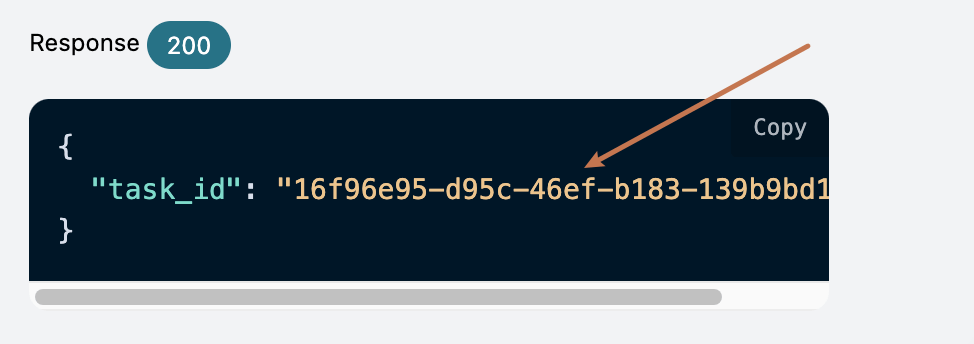
要使用 AI 证件照 Task API,需要先到 申请页面 AI证件照制作 API 申请相应的服务,然后复制 AI证件照制作 API的任务ID,如图所示:
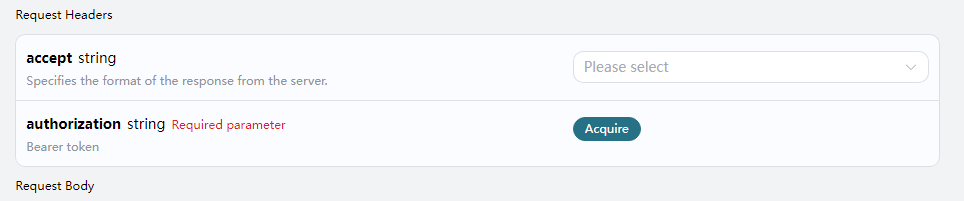
最后进入Tasks API页面 AI 证件照 Task API 申请相应的服务,进入页面之后,点击「Acquire」按钮,如图所示:
如果您尚未登录或注册,会自动跳转到登录页面邀请您来注册和登录,登录注册之后会自动返回当前页面。
首次申请时会有免费额度赠送,可以免费使用该 API。
请求示例
AI 证件照 Task API 可以用于查询 AI证件照制作 API 的结果。关于怎样使用 AI证件照制作 API,请参考文档 AI证件照制作 API 。
我们以 AI证件照制作 API 服务返回的任务ID一个为例,演示如何使用该 API。假设我们有一个任务ID:16f96e95-d95c-46ef-b183-139b9bd1aebd,接下来演示如何通过传入一个任务ID来。
任务示例图
设置请求头和请求体
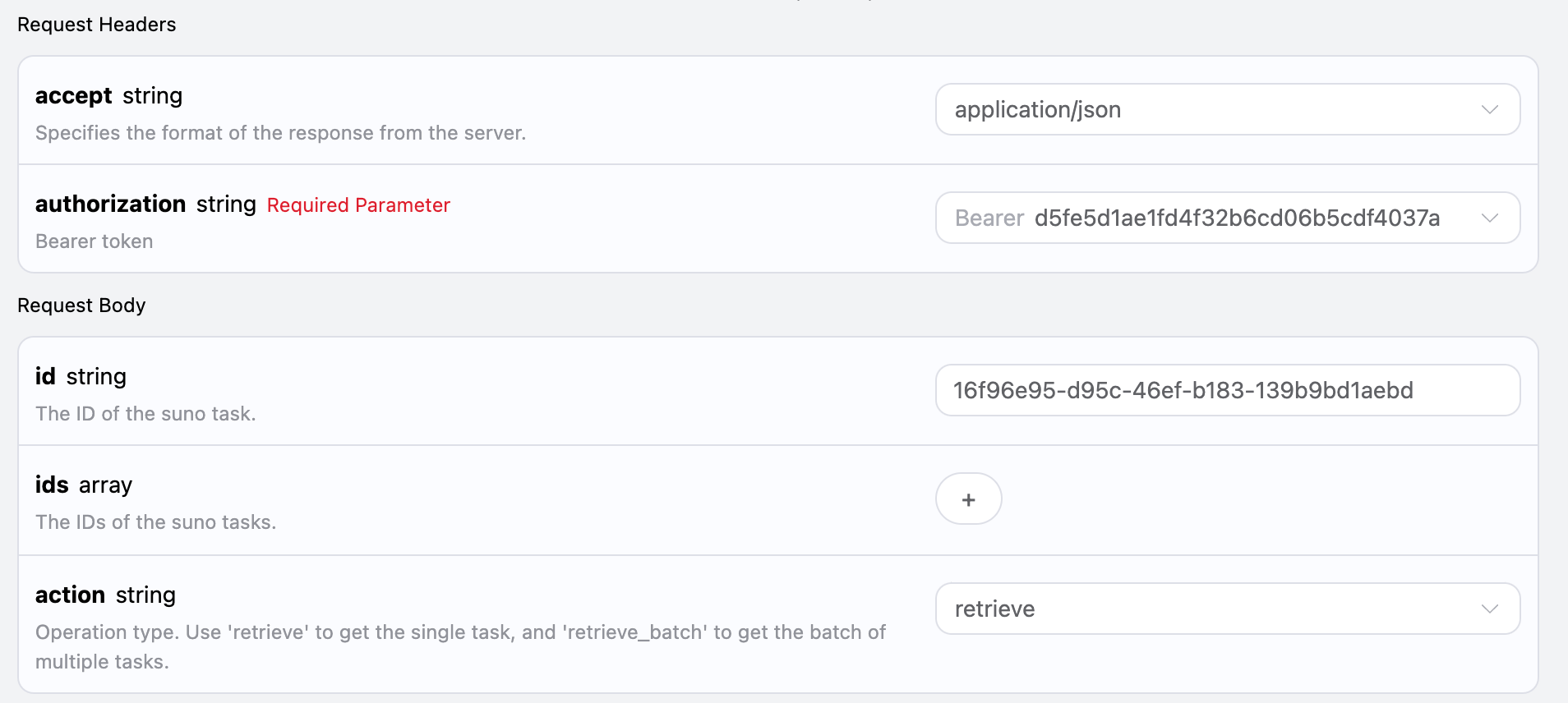
Request Headers 包括:
accept:指定接收 JSON 格式的响应结果,这里填写为 application/json。authorization:调用 API 的密钥,申请之后可以直接下拉选择。
Request Body 包括:
id:上传的任务ID。action:对任务的操作方式。
设置如下图所示:
代码示例
可以发现,在页面右侧已经自动生成了各种语言的代码,如图所示:
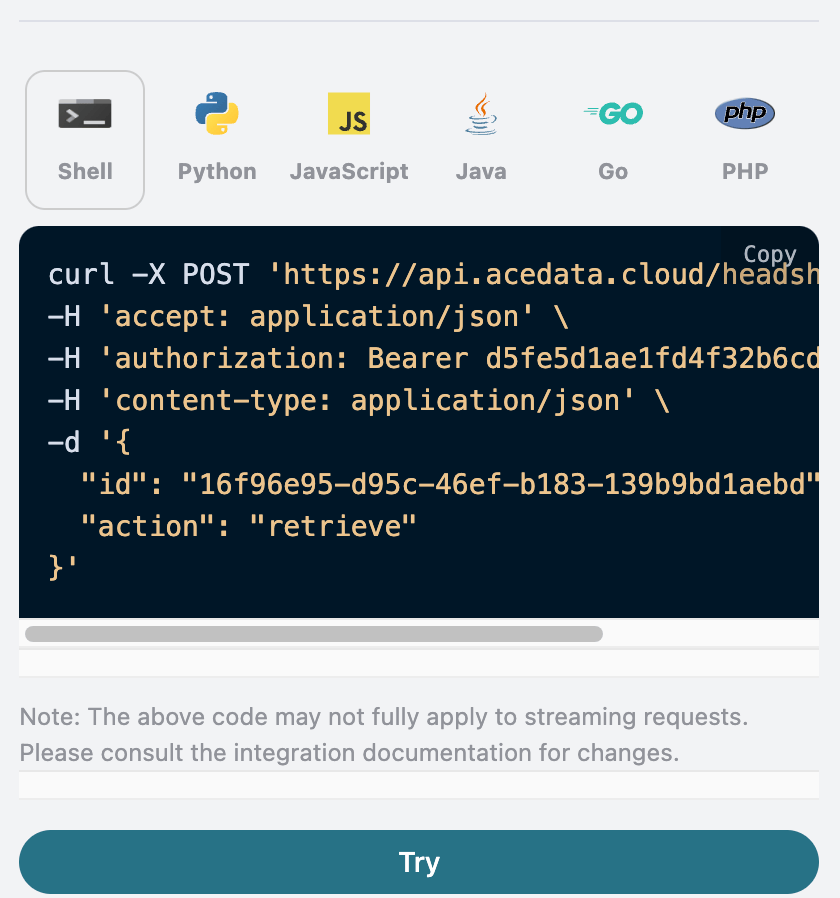
部分代码示例如下:
CURL
1
2
3
4
5
6
7
8
|
curl -X POST 'https://api.acedata.cloud/headshots/tasks' \
-H 'accept: application/json' \
-H 'authorization: Bearer {token}' \
-H 'content-type: application/json' \
-d '{
  "id": "16f96e95-d95c-46ef-b183-139b9bd1aebd",
  "action": "retrieve"
}'
|
Python
1
2
3
4
5
6
7
8
9
10
11
12
13
14
15
16
17
|
import requests

url = "https://api.acedata.cloud/headshots/tasks"

headers = {
    "accept": "application/json",
    "authorization": "Bearer {token}",
    "content-type": "application/json"
}

payload = {
    "id": "16f96e95-d95c-46ef-b183-139b9bd1aebd",
    "action": "retrieve"
}

response = requests.post(url, json=payload, headers=headers)
print(response.text)
|
响应示例
请求成功后,API 将返回此处证件照任务的详情信息。例如:
1
2
3
4
5
6
7
8
9
10
11
12
13
14
15
16
17
18
19
20
21
22
23
24
25
26
27
28
29
30
31
32
33
34
|
{
  "_id": "67276ab6550a4144a53b6036",
  "id": "16f96e95-d95c-46ef-b183-139b9bd1aebd",
  "api_id": "53bcc3f7-12ec-4f04-8ca4-20f150dcde2a",
  "application_id": "1af53f80-c166-4f54-a8ea-0ffc24d8e2cd",
  "created_at": 1730636470.402,
  "credential_id": "3c253880-21ef-478a-9389-c09fa837ac7c",
  "request": {
    "mode": "relax",
    "template": "male_portrait",
    "image_urls": [
      "https://cdn.zhishuyun.com/2024-11-03-d23744954ca4819503469f04f2268aa0.jpg"
    ],
    "callback_url": "https://webhook.site/00f38b26-4289-4899-83d6-0cea7308850a"
  },
  "trace_id": "6eded0e2-274d-4cde-a567-d6b0decb9a97",
  "user_id": "ad7afe47-cea9-4cda-980f-2ad8810e51cf",
  "response": {
    "success": true,
    "task_id": "16f96e95-d95c-46ef-b183-139b9bd1aebd",
    "data": [
      {
        "id": "202411032022077381",
        "image_url": "https://platform.cdn.acedata.cloud/headshots/16f96e95-d95c-46ef-b183-139b9bd1aebd.png",
        "template": "男形象照"
      },
      {
        "id": "202411032022079194",
        "image_url": "https://platform.cdn.acedata.cloud/headshots/16f96e95-d95c-46ef-b183-139b9bd1aebd.png",
        "template": "男形象照"
      }
    ]
  }
}
|
返回结果一共有多个字段,request 字段就是发起任务时的 request body,同时response 字段是任务完成后返回的response body。字段介绍如下。
id,生成此证件照任务的 ID,用于唯一标识此次证件照生成任务。request,查询证件照任务中的请求信息。response,查询证件照任务中的返回信息。
批量查询操作
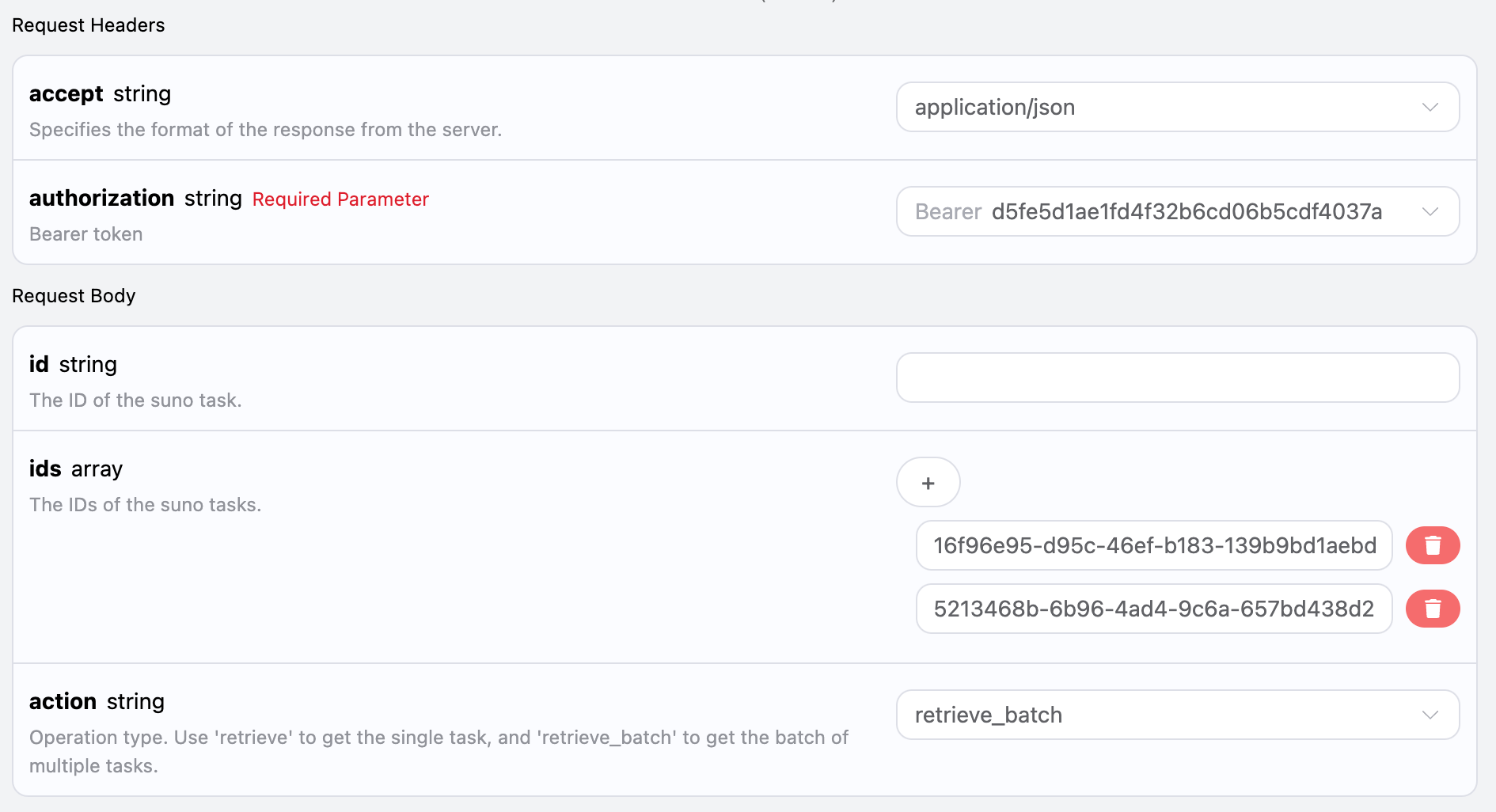
这是是针对多个任务ID来进行查询证件照任务详情,与上面不同的是需要将action选中为retrieve_batch
Request Body 包括:
ids:上传的任务ID数组。action:对任务的操作方式。
设置如下图所示:
代码示例
可以发现,在页面右侧已经自动生成了各种语言的代码,如图所示:
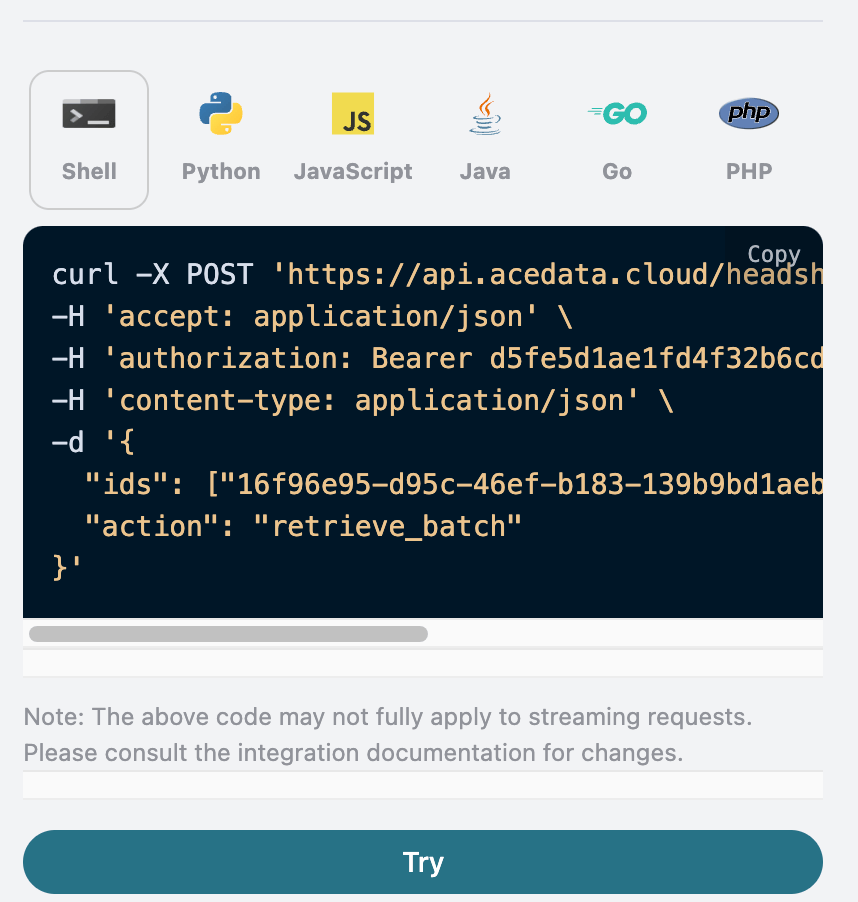
部分代码示例如下:
CURL
1
2
3
4
5
6
7
8
|
curl -X POST 'https://api.acedata.cloud/headshots/tasks' \
-H 'accept: application/json' \
-H 'authorization: Bearer {token}' \
-H 'content-type: application/json' \
-d '{
  "ids": ["16f96e95-d95c-46ef-b183-139b9bd1aebd","5213468b-6b96-4ad4-9c6a-657bd438d299"],
  "action": "retrieve_batch"
}'
|
Python
1
2
3
4
5
6
7
8
9
10
11
12
13
14
15
16
17
|
import requests

url = "https://api.acedata.cloud/headshots/tasks"

headers = {
    "accept": "application/json",
    "authorization": "Bearer {token}",
    "content-type": "application/json"
}

payload = {
    "ids": ["16f96e95-d95c-46ef-b183-139b9bd1aebd","5213468b-6b96-4ad4-9c6a-657bd438d299"],
    "action": "retrieve_batch"
}

response = requests.post(url, json=payload, headers=headers)
print(response.text)
|
响应示例
请求成功后,API 将返回此次所有批量证件照任务的具体详情信息。例如:
1
2
3
4
5
6
7
8
9
10
11
12
13
14
15
16
17
18
19
20
21
22
23
24
25
26
27
28
29
30
31
32
33
34
35
36
37
38
39
40
41
42
43
44
45
46
47
48
49
50
51
52
53
54
55
56
57
58
59
60
61
62
|
{
  "items": [
    {
      "_id": "67276ab6550a4144a53b6036",
      "id": "16f96e95-d95c-46ef-b183-139b9bd1aebd",
      "api_id": "53bcc3f7-12ec-4f04-8ca4-20f150dcde2a",
      "application_id": "1af53f80-c166-4f54-a8ea-0ffc24d8e2cd",
      "created_at": 1730636470.402,
      "credential_id": "3c253880-21ef-478a-9389-c09fa837ac7c",
      "request": {
        "mode": "relax",
        "template": "male_portrait",
        "image_urls": [
          "https://cdn.zhishuyun.com/2024-11-03-d23744954ca4819503469f04f2268aa0.jpg"
        ],
        "callback_url": "https://webhook.site/00f38b26-4289-4899-83d6-0cea7308850a"
      },
      "trace_id": "6eded0e2-274d-4cde-a567-d6b0decb9a97",
      "user_id": "ad7afe47-cea9-4cda-980f-2ad8810e51cf",
      "response": {
        "success": true,
        "task_id": "16f96e95-d95c-46ef-b183-139b9bd1aebd",
        "data": [
          {
            "id": "202411032022077381",
            "image_url": "https://platform.cdn.acedata.cloud/headshots/16f96e95-d95c-46ef-b183-139b9bd1aebd.png",
            "template": "男形象照"
          },
          {
            "id": "202411032022079194",
            "image_url": "https://platform.cdn.acedata.cloud/headshots/16f96e95-d95c-46ef-b183-139b9bd1aebd.png",
            "template": "男形象照"
          }
        ]
      }
    },
    {
      "_id": "67276c52550a4144a53b995b",
      "id": "5213468b-6b96-4ad4-9c6a-657bd438d299",
      "api_id": "53bcc3f7-12ec-4f04-8ca4-20f150dcde2a",
      "application_id": "1af53f80-c166-4f54-a8ea-0ffc24d8e2cd",
      "created_at": 1730636882.359,
      "credential_id": "3c253880-21ef-478a-9389-c09fa837ac7c",
      "request": {
        "mode": "relax",
        "template": "male_portrait",
        "image_urls": [
          "https://cdn.zhishuyun.com/2024-11-03-d23744954ca4819503469f04f2268aa0.jpg"
        ],
        "callback_url": "https://webhook.site/00f38b26-4289-4899-83d6-0cea7308850a"
      },
      "trace_id": "50b2b4a8-6c1c-4b95-ac0b-46e5b97c7b18",
      "user_id": "ad7afe47-cea9-4cda-980f-2ad8810e51cf",
      "response": {
        "task_id": "5213468b-6b96-4ad4-9c6a-657bd438d299",
        "status": "unknown",
        "data": []
      }
    }
  ],
  "count": 2
}
|
返回结果一共有多个字段,其中items是包含了批量证件照任务的具体详情信息,每个证件照任务的具体信息与上文的字段一样,字段信息如下。
items,批量证件照任务的所有具体详情信息。它是一个数组,每个数组的元素和上文查询单个任务的返回结果格式是一样的。count,此处批量查询证件照任务的个数。
错误处理
在调用 API 时,如果遇到错误,API 会返回相应的错误代码和信息。例如:
400 token_mismatched:Bad request, possibly due to missing or invalid parameters.400 api_not_implemented:Bad request, possibly due to missing or invalid parameters.401 invalid_token:Unauthorized, invalid or missing authorization token.429 too_many_requests:Too many requests, you have exceeded the rate limit.500 api_error:Internal server error, something went wrong on the server.
错误响应示例
1
2
3
4
5
6
7
8
|
{
  "success": false,
  "error": {
    "code": "api_error",
    "message": "fetch failed"
  },
  "trace_id": "2cf86e86-22a4-46e1-ac2f-032c0f2a4e89"
}
|
结论
通过本文档,您已经了解了如何使用 AI 证件照 Task API 进行查询单个或批量证件照任务的所有具体详情信息。希望本文档能帮助您更好地对接和使用该 API。如有任何问题,请随时联系我们的技术支持团队。