本文将介绍一种 SeeDream Images Generation API 对接说明,它是可以通过输入自定义参数来生成 SeeDream 官方的图片。
申请流程
要使用 API,需要先到 SeeDream Images Generation API 对应页面申请对应的服务,进入页面之后,点击「Acquire」按钮,如图所示:

如果你尚未登录或注册,会自动跳转到登录页面邀请您来注册和登录,登录注册之后会自动返回当前页面。
在首次申请时会有免费额度赠送,可以免费使用该 API。
基本使用
首先先了解下基本的使用方式,就是输入提示词 prompt、 生成行为 action、图片尺寸 size,便可获得处理后的结果,首先需要简单地传递一个 action 字段,它的值为 generate,然后我们还需要输入提示词,具体的内容如下:

可以看到这里我们设置了 Request Headers,包括:
accept:想要接收怎样格式的响应结果,这里填写为application/json,即 JSON 格式。authorization:调用 API 的密钥,申请之后可以直接下拉选择。
另外设置了 Request Body,包括:
prompt:提示词。model:生成模型,默认doubao-seedream-4.0。image: 输入的图片信息,支持 URL 或 Base64 编码。其中,doubao-seedream-4.5、doubao-seedream-4.0支持单图或多图输入,doubao-seededit-3.0-i2i仅支持单图输入,doubao-seededit-3.0-t2i不支持该参size: 指定生成图像的尺寸信息,支持以下两种方式,不可混用。方式 1 | 指定生成图像的分辨率,并在prompt中用自然语言描述图片宽高比、图片形状或图片用途,最终由模型判断生成图片的大小。方式 2 | 指定生成图像的宽高像素值:默认值:2048x2048根据模型不同默认值不同seed: 随机数种子,用于控制模型生成内容的随机性。取值范围为 [-1, 2147483647]。仅doubao-seedream-3.0-t2i、doubao-seededit-3.0-i2i支持该参数sequential_image_generation: 组图:基于您输入的内容,生成的一组内容关联的图片。仅doubao-seedream-4.5、doubao-seedream-4.0支持该参数, 默认disabledstream: 控制是否开启流式输出模式。仅doubao-seedream-4.5、doubao-seedream-4.0支持该参数,默认是falseguidance_scale: 模型输出结果与prompt的一致程度,生成图像的自由度,又称为文本权重;值越大,模型自由度越小,与用户输入的提示词相关性越强。取值范围:[1, 10] 。doubao-seedream-3.0-t2i默认值 2.5,doubao-seededit-3.0-i2i默认值 5.5, 其他不支持response_format: 指定生成图像的返回格式。默认是url,也支持b64_jsonwatermark: 是否在生成的图片中添加水印。默认是truecallback_url:需要回调结果的 URL。
选择之后,可以发现右侧也生成了对应代码,如图所示:
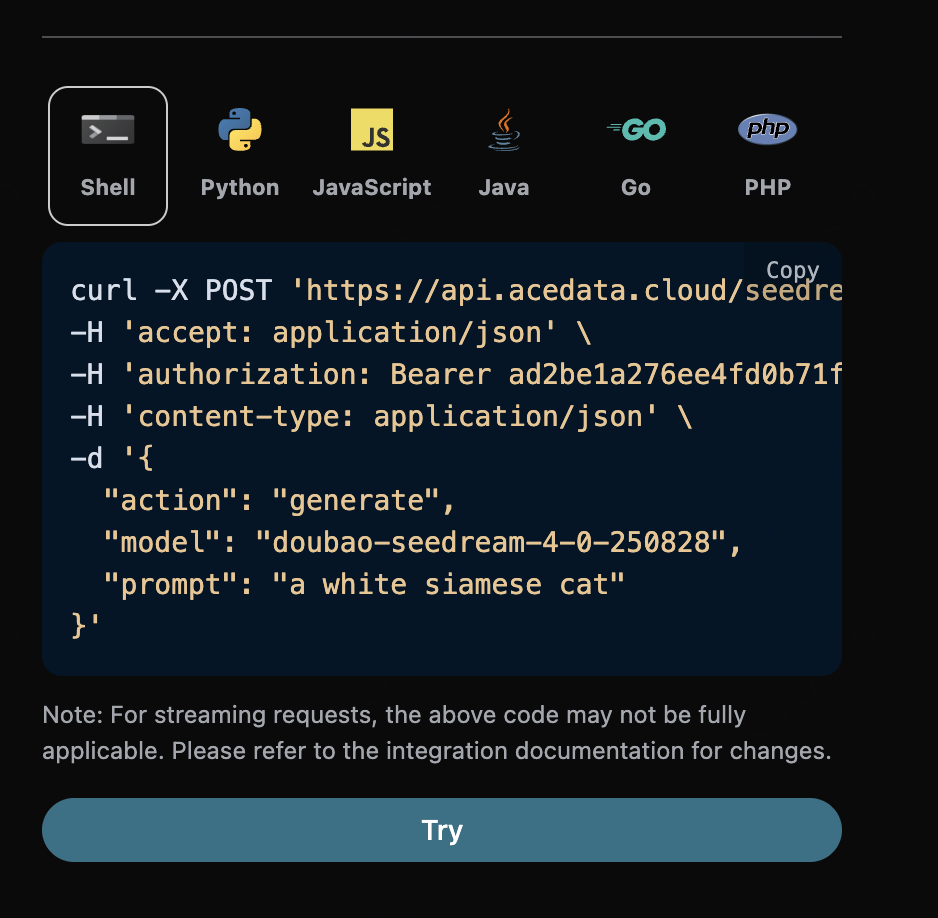
点击「Try」按钮即可进行测试,如上图所示,这里我们就得到了如下结果:
1 |
{ |
返回结果一共有多个字段,介绍如下:
success,此时视频生成任务的状态情况。task_id,此时视频生成任务 ID。trace_id,此时视频生成跟踪 ID。data,此时图像生成任务的结果列表。image_url,此时图片生成任务的链接。prompt,提示词。size: 生成图的像素
可以看到我们得到了满意的图片信息,我们只需要根据结果中 data 的图片链接地址获取生成的 SeeDream 图片即可。
另外如果想生成对应的对接代码,可以直接复制生成,例如 CURL 的代码如下:
1 |
curl -X POST 'https://api.acedata.cloud/seedream/images' \ |
编辑图片任务
如果想对某张图片进行编辑的话, 首先参数image必须传入需要编辑的图片链接
- model:此次编辑图片任务所采用的模型,该任务目前支持
doubao-seedream-4.5、doubao-seedream-4.0支持单图或多图输入,doubao-seededit-3.0-i2i仅支持单图输入。 - image:上传需要编辑的图片,一张或者多张
填写样例如下:
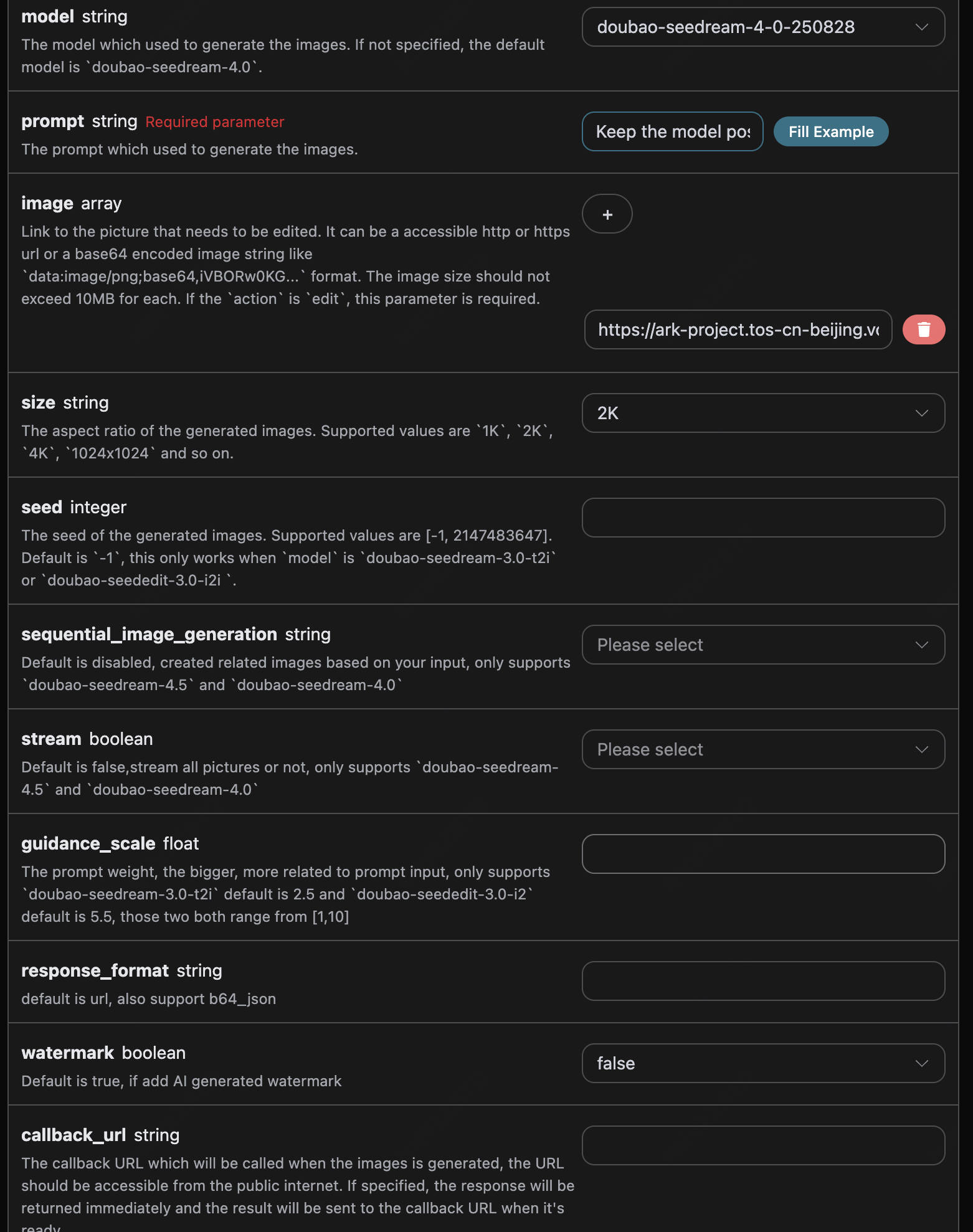
对应的代码:
1 |
import requests |
点击运行,可以发现会立即得到一个结果,如下:
1 |
{ |
可以看到,生成的效果是对原图片进行编辑的效果,结果与上文类似。
异步回调
由于 SeeDream Images Generation API 生成的时间相对较长,大约需要 1-2 分钟,如果 API 长时间无响应,HTTP 请求会一直保持连接,导致额外的系统资源消耗,所以本 API 也提供了异步回调的支持。
整体流程是:客户端发起请求的时候,额外指定一个 callback_url 字段,客户端发起 API 请求之后,API 会立马返回一个结果,包含一个 task_id 的字段信息,代表当前的任务 ID。当任务完成之后,生成图片的结果会通过 POST JSON 的形式发送到客户端指定的 callback_url,其中也包括了 task_id 字段,这样任务结果就可以通过 ID 关联起来了。
下面我们通过示例来了解下具体怎样操作。
点击运行,可以发现会立即得到一个结果,如下:
1 |
{ |
内容如下:
1 |
{ |
可以看到结果中有一个 task_id 字段,其他的字段都和上文类似,通过该字段即可实现任务的关联。
错误处理
在调用 API 时,如果遇到错误,API 会返回相应的错误代码和信息。例如:
400 token_mismatched:Bad request, possibly due to missing or invalid parameters.400 api_not_implemented:Bad request, possibly due to missing or invalid parameters.401 invalid_token:Unauthorized, invalid or missing authorization token.429 too_many_requests:Too many requests, you have exceeded the rate limit.500 api_error:Internal server error, something went wrong on the server.
错误响应示例
1 |
{ |
结论
通过本文档,您已经了解了如何使用 SeeDream Images Generation API 可通过输入提示词来生成图片。希望本文档能帮助您更好地对接和使用该 API。如有任何问题,请随时联系我们的技术支持团队。