本接口基于 Fish Audio 官方 TTS API,仅在鉴权方式(使用本平台 token)和异步回调(callback_url 扩展)上有差异,请求体结构与上游一致。地址为 POST https://api.acedata.cloud/fish/tts。
申请流程
要使用 Fish TTS API,首先到 Ace Data Cloud 控制台 获取您的 API Token,留作备用。
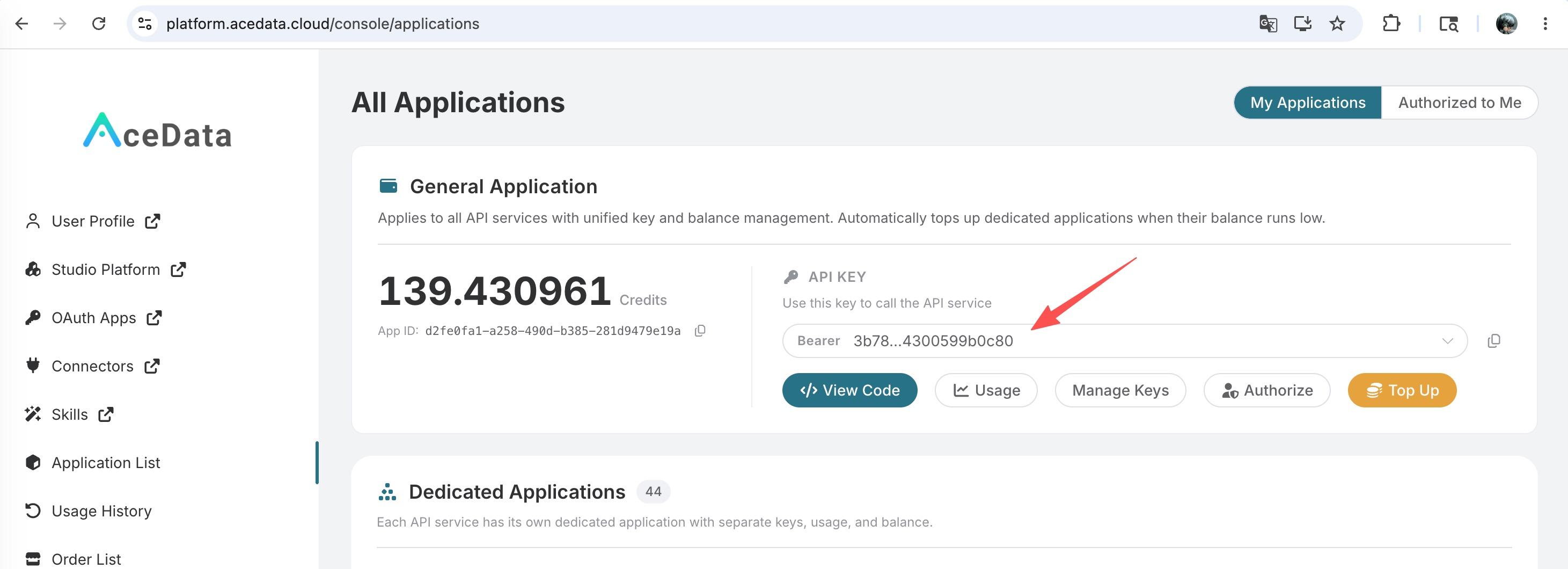
如果你尚未登录或注册,会自动跳转到登录页面邀请你注册和登录,完成后会自动返回当前页面。
一个 API Token 即可调用平台所有服务,无需为每个服务单独申请。 首次申请会赠送免费额度,可免费体验;额度不足时可在 控制台 充值通用余额。
📘 完整文档:Fish TTS API →
请求头
| Header | 必填 | 说明 |
|---|---|---|
authorization |
是 | Bearer {token},{token} 是在本平台申请的密钥。 |
content-type |
是 | application/json。 |
accept |
否 | application/json。 |
model |
否 | TTS 模型,可选 s1 或 s2-pro,默认 s2-pro。s2-pro 表现力更强;s1 更稳定,长文本不易跑偏。 |
请求体字段
| 字段 | 类型 | 必填 | 说明 | |
|---|---|---|---|---|
text |
string | 是 | 要合成的文本,非空字符串。 | |
format |
string | 是 | 输出音频格式。当前必须显式传值,可选 mp3 或 pcm。即使官方文档列出 wav、opus,本接口上游也会返回 400 Input should be 'pcm' or 'mp3'。 |
|
reference_id |
string \ | string[] | 否 | 克隆音色 ID(可由 Fish Model API 创建,或在 Fish Model Query 中检索)。 |
references |
object[] | 否 | 内联参考样本,结构与上游一致,每项含 audio 与 text。与 reference_id 二选一。 |
|
sample_rate |
integer | 否 | 采样率,常用 16000、22050、44100。format=mp3 默认 44100。 |
|
mp3_bitrate |
integer | 否 | MP3 码率,可选 64、128、192。仅 format=mp3 生效。 |
|
prosody |
object | 否 | 韵律覆盖,支持 speed(语速,1.0 为原速)和 volume(音量增益 dB)。例如 {"speed":1.2,"volume":0}。 |
|
chunk_length |
integer | 否 | 上游分片长度,默认上游决定。 | |
temperature |
number | 否 | 采样温度,范围约 0.0–1.0。 | |
top_p |
number | 否 | top-p 采样参数。 | |
latency |
string | 否 | normal 或 balanced,缺省由本接口自动补 normal(直接传空字符串上游会拒绝)。 |
|
normalize |
boolean | 否 | 是否对文本做归一化。 | |
callback_url |
string | 否 | 异步回调地址,详见下文「异步回调」。这是相对官方接口的扩展。 |
字段命名与上游完全一致。除
callback_url外,其余字段含义和取值参见 Fish 官方 TTS 文档。
示例 1:最小请求(text + format=mp3)
1 |
curl -X POST 'https://api.acedata.cloud/fish/tts' \ |
返回(实测):
1 |
{ |
audio_url 是 Fish R2 直链,可直接 GET 下载或在 <audio> 中播放,签名通常在 1 小时内有效,建议落地后转存到自己的对象存储。
示例 2:使用克隆音色 reference_id
下面用 Fish 平台上一个公开的西班牙语音色(_id 可通过 Fish Model Query 检索得到):
1 |
curl -X POST 'https://api.acedata.cloud/fish/tts' \ |
返回(实测):
1 |
{ |
示例 3:调节语速 / 音量(prosody)
1 |
curl -X POST 'https://api.acedata.cloud/fish/tts' \ |
返回(实测):
1 |
{ |
speed 大于 1 加快,小于 1 减慢;volume 单位 dB,0 表示不变,正数增益,负数衰减。
示例 4:切换模型 + 控制码率
通过 HTTP 头 model: s1 切换到稳定型模型,请求体中加 mp3_bitrate: 128 控制 MP3 码率:
1 |
curl -X POST 'https://api.acedata.cloud/fish/tts' \ |
返回(实测):
1 |
{ |
示例 5:PCM 原始波形
需要在浏览器里做实时拼接、或在客户端做后续处理(混音、变速)的场景,推荐使用 pcm:
1 |
curl -X POST 'https://api.acedata.cloud/fish/tts' \ |
返回(实测):
1 |
{ |
当前响应链接的扩展名固定为
.mp3,实际内容为请求中指定format的字节流。下载时应根据请求里的format决定如何解析。
异步回调(callback_url)
长文本一次合成可能需要十几秒到几十秒,连接如果中断需要重试。请求体中传 callback_url 后,接口会立即返回 {task_id, started_at},上游真正完成时把完整结果以 POST JSON 形式回调到该 URL,请求体中带同一个 task_id。
1 |
curl -X POST 'https://api.acedata.cloud/fish/tts' \ |
立即返回(实测):
1 |
{ |
稍后 callback_url 会收到形如:
1 |
{ |
也可以用 Fish Tasks API 主动按 task_id 拉取结果,详见该文档。
错误处理
400 token_mismatched:请求参数缺失或不合法(最常见是漏传format、text为空)。401 invalid_token:鉴权 token 不存在或无效。429 too_many_requests:触发账号速率限制。500 api_error:服务器内部错误。
错误响应示例:
1 |
{ |
参数校验错误会把上游的 pydantic 报错原文放在 message 字段,便于定位是哪个字段不合法,例如:
1 |
{ |
结论
接入 Fish TTS 的最小代价是:在已有调用 api.fish.audio/v1/tts 的代码里把鉴权换成本平台 token,并在请求体里显式带上 format: "mp3"。长文本场景建议使用 callback_url 异步回调;对克隆音色 reference_id 的发现,请配合 Fish Model Query 与 Fish Model Get。