0%

Nano Banana Images API 对接说明

本文介绍 Nano Banana Images API 的对接与使用。该接口支持两种能力:图像生成(generate)图像编辑(edit)

申请流程

要使用 Nano Banana Images API,首先到 Ace Data Cloud 控制台 获取您的 API Token,留作备用。
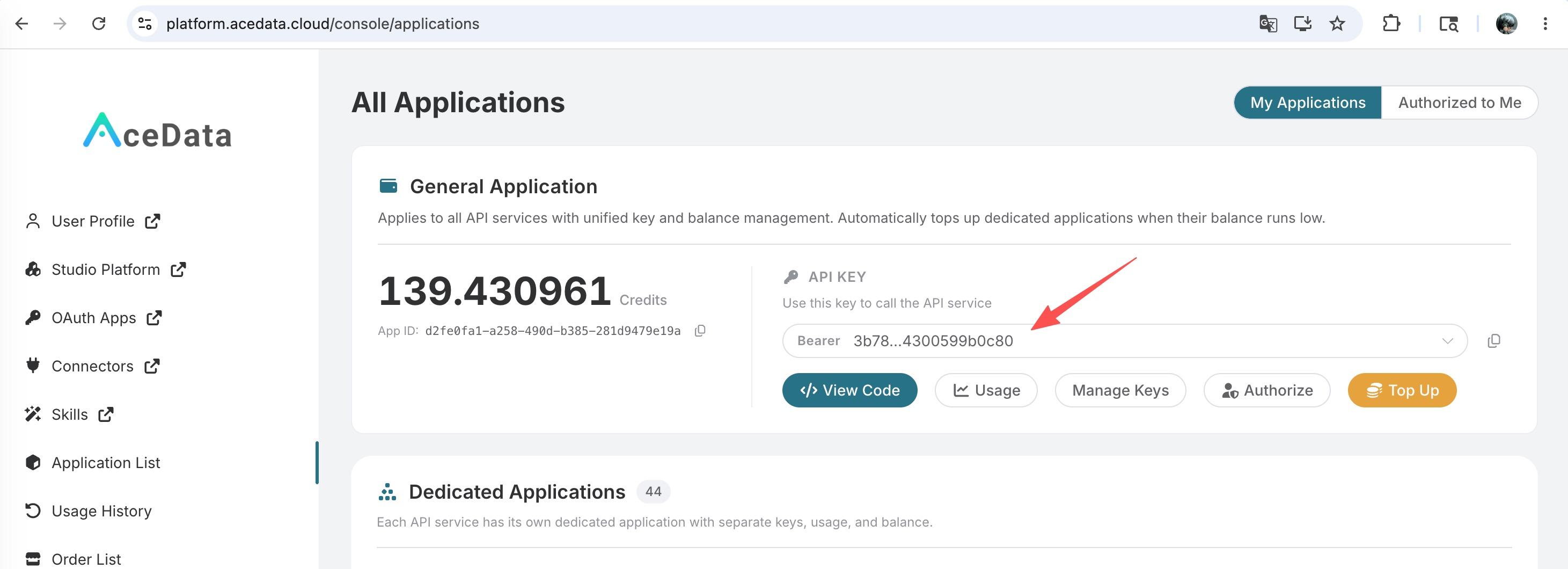
如果你尚未登录或注册,会自动跳转到登录页面邀请你注册和登录,完成后会自动返回当前页面。

一个 API Token 即可调用平台所有服务,无需为每个服务单独申请。 首次申请会赠送免费额度,可免费体验;额度不足时可在 控制台 充值通用余额。

📘 完整文档:Nano Banana Images API →

接口概览

  • Base URLhttps://api.acedata.cloud
  • EndpointPOST /nano-banana/images
  • 认证方式:HTTP Header 中携带 authorization: Bearer {token}
  • 请求头

    • accept: application/json
    • content-type: application/json
  • 动作(action)

    • generate:根据文本提示词生成图片
    • edit:基于给定图片进行编辑
  • 模型(model)(可选):

    • nano-banana(默认):基于 Gemini 2.5 Flash Image,速度快,成本低
    • nano-banana-2:基于 Gemini 3.1 Flash Image Preview,Pro 级质量 + Flash 速度
    • nano-banana-pro:基于 Gemini 3 Pro Image Preview,最高质量
  • 异步回调:可选,通过 callback_url 接收任务完成通知与结果

快速开始:生成图片(action=generate

最小必需参数actionprompt
当你只想根据提示词直接出图时,设置 actiongenerate,并提供清晰的 prompt 即可。

请求示例(cURL)

1
2
3
4
5
6
7
8
9
curl -X POST 'https://api.acedata.cloud/nano-banana/images' \
-H 'authorization: Bearer {token}' \
-H 'accept: application/json' \
-H 'content-type: application/json' \
-d '{
"action": "generate",
"prompt": "A photorealistic close-up portrait of an elderly Japanese ceramicist with deep, sun-etched wrinkles and a warm, knowing smile. He is carefully inspecting a freshly glazed tea bowl. The setting is his rustic, sun-drenched workshop. The scene is illuminated by soft, golden hour light streaming through a window, highlighting the fine texture of the clay. Captured with an 85mm portrait lens, resulting in a soft, blurred background (bokeh). The overall mood is serene and masterful. Vertical portrait orientation.",
"count": 1
}'

请求示例(Python)

1
2
3
4
5
6
7
8
9
10
11
12
13
14
15
16
17
18
19
20
21
22
23
import requests

url = "https://api.acedata.cloud/nano-banana/images"
headers = {
"authorization": "Bearer {token}",
"accept": "application/json",
"content-type": "application/json",
}
payload = {
"action": "generate",
"prompt": (
"A photorealistic close-up portrait of an elderly Japanese ceramicist "
"with deep, sun-etched wrinkles and a warm, knowing smile. He is carefully "
"inspecting a freshly glazed tea bowl. The setting is his rustic, sun-drenched "
"workshop. The scene is illuminated by soft, golden hour light streaming through "
"a window, highlighting the fine texture of the clay. Captured with an 85mm "
"portrait lens, resulting in a soft, blurred background (bokeh). The overall mood "
"is serene and masterful. Vertical portrait orientation."
),
"count": 1
}
resp = requests.post(url, json=payload, headers=headers)
print(resp.json())

成功返回示例

1
2
3
4
5
6
7
8
9
10
11
{
"success": true,
"task_id": "056f0589-a3dd-4ec2-8440-ad61f5038dfa",
"trace_id": "c48de83f-0077-426e-b02b-ff1d58179064",
"data": [
{
"prompt": "A photorealistic close-up portrait of an elderly Japanese ceramicist with deep, sun-etched wrinkles and a warm, knowing smile. He is carefully inspecting a freshly glazed tea bowl. The setting is his rustic, sun-drenched workshop. The scene is illuminated by soft, golden hour light streaming through a window, highlighting the fine texture of the clay. Captured with an 85mm portrait lens, resulting in a soft, blurred background (bokeh). The overall mood is serene and masterful. Vertical portrait orientation.",
"image_url": "https://platform.cdn.acedata.cloud/nanobanana/69790adb-c85d-4362-ad9e-0c9ba4352cf4.png"
}
]
}

字段说明

  • success:本次请求是否成功。
  • task_id:任务 ID。
  • trace_id:链路追踪 ID,便于排查问题。
  • data[]:结果列表。

    • prompt:用于生成的提示词(回显)。
    • image_url:生成图片的直链 URL。

注:/nano-banana/images 仅需 actionprompt 即可生成图片

编辑图片(action=edit

当你希望基于已有图片进行编辑时,设置 actionedit,并通过 image_urls 传入待编辑的图片链接列表(1 张或多张),同时提供描述编辑目标的 prompt

比如这里我们提供一张人物照片,一张衣服照片,让人物穿上这个衣服,就可以同时传入图片链接,并且指定 action 为 edit,URL 可以是 HTTP URL,以 httpshttp 协议的公开可访问链接,也可以是 Base64 编码的图片,如 data:image/png;base64,iVBORw0KGgoAAAANSUhEUgAAA+gAAAVGCAMAAAA6u2FyAAADAFBMVEXq6uwdHCEeHyMdHS....

请求示例(cURL)

1
2
3
4
5
6
7
8
9
10
11
12
13
curl -X POST 'https://api.acedata.cloud/nano-banana/images' \
-H 'authorization: Bearer {token}' \
-H 'accept: application/json' \
-H 'content-type: application/json' \
-d '{
"action": "edit",
"prompt": "let this man wear on this T-shirt",
"image_urls": [
"https://cdn.acedata.cloud/v8073y.png",
"https://cdn.acedata.cloud/44xlah.png"
],
"count": 1
}'

请求示例(Python)

1
2
3
4
5
6
7
8
9
10
11
12
13
14
15
16
17
18
19
import requests

url = "https://api.acedata.cloud/nano-banana/images"
headers = {
"authorization": "Bearer {token}",
"accept": "application/json",
"content-type": "application/json",
}
payload = {
"action": "edit",
"prompt": "let this man wear on this T-shirt",
"image_urls": [
"https://cdn.acedata.cloud/v8073y.png",
"https://cdn.acedata.cloud/44xlah.png"
],
"count": 1
}
resp = requests.post(url, json=payload, headers=headers)
print(resp.json())

成功返回示例

1
2
3
4
5
6
7
8
9
10
11
{
"success": true,
"task_id": "93f11baf-347b-4bb4-9520-8653cb46d6a3",
"trace_id": "a9063166-26ed-4451-85b5-54e896817c69",
"data": [
{
"prompt": "let this man wear on this T-shirt",
"image_url": "https://platform.cdn.acedata.cloud/nanobanana/8e9e0253-26f4-45b9-b3f8-ac1aed1c284b.png"
}
]
}

字段说明

  • image_urls[]:待编辑图片 URL 列表(必须可公网访问)。可传多张,服务会结合这些素材与 prompt 完成编辑。
  • 其余字段同「生成图片」返回。

异步回调(可选,推荐)

生成或编辑可能需要一定时间。为避免长连接占用资源,建议通过 callback_url 使用 Webhook 回调

  1. 在请求体中添加 callback_url,例如你的服务端 Webhook 地址(需可公网访问,支持 POST JSON)。
  2. API 会 立即返回 包含 task_id 的响应(或包含基本结果)。
  3. 当任务完成后,平台将以 POST 的方式将完整 JSON 发送至 callback_url。你可以通过 task_id 将请求与结果关联。

回调载荷示例(字段结构与同步成功返回一致):

1
2
3
4
5
6
7
8
9
10
11
{
"success": true,
"task_id": "6a97bf49-df50-4129-9e46-119aa9fca73c",
"trace_id": "9b4b1ff3-90f2-470f-b082-1061ec2948cc",
"data": [
{
"prompt": "a white siamese cat",
"image_url": "https://platform.cdn.acedata.cloud/nanobanana/xxxxxxxx-xxxx-xxxx-xxxx-xxxxxxxxxxxx.png"
}
]
}

错误处理

调用失败时会返回标准错误格式与追踪 ID。常见错误如下:

  • 400 token_mismatched:请求不合法或参数错误。
  • 400 api_not_implemented:接口未实现(请联系支持)。
  • 401 invalid_token:鉴权失败或缺少 Token。
  • 429 too_many_requests:请求频率超限。
  • 500 api_error:服务端异常。

错误响应示例

1
2
3
4
5
6
7
8
{
"success": false,
"error": {
"code": "api_error",
"message": "Internal server error."
},
"trace_id": "2cf86e86-22a4-46e1-ac2f-032c0f2a4e89"
}

参数对照与注意事项

  • 必填actionprompt
  • 编辑专用image_urls(数组,至少 1 项)
  • 可选model(默认 nano-banana,可选 nano-banana-2nano-banana-pro)、aspect_ratio(宽高比,如 1:116:9)、resolution(分辨率,如 1K2K4K)、callback_url(用于异步回调)
  • Headers:必须提供 authorization: Bearer {token}accept 建议设为 application/json
  • 图片可访问性image_urls 必须为可公网访问的直链(HTTP/HTTPS),建议使用 HTTPS
  • 幂等与追踪:保留 task_idtrace_id,便于故障排查与结果关联